准备
- 1.一个 cloudflare 账号 https://dash.cloudflare.com/
- 2.一个 B2 账号 https://www.backblaze.com/b2/cloud-storage.html
- 3.windows 软件 ShareX
步骤
1.注册 B2 账号,点击进入 B2 Cloud Storage,点击 Buckets 创建一个 BUcket,设为 public,并上传一个图片,记录下下图要用的域名

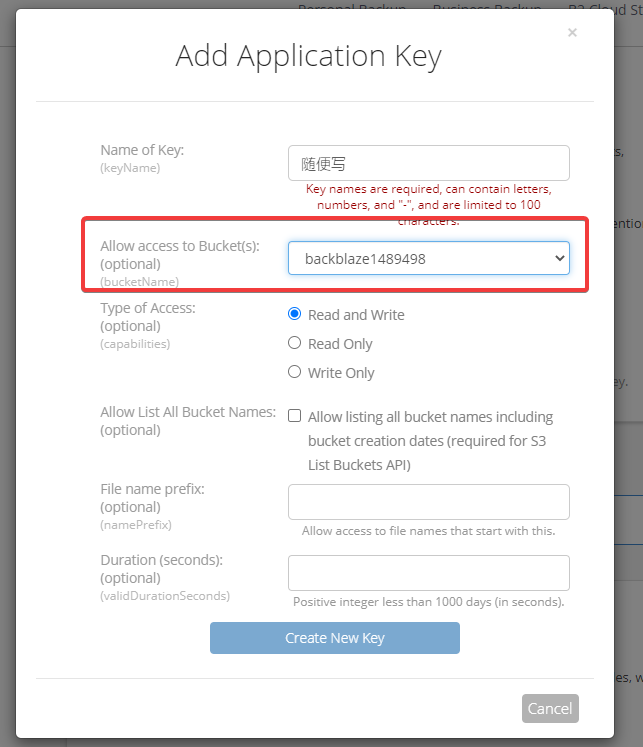
2.点击 App keys,添加一个新的 key,bucket 就选你刚创建的那个,记录下你的密钥,之后要在 ShareX 中用
3.打开 cf,cname 一下上图要记的域名,小云朵点亮

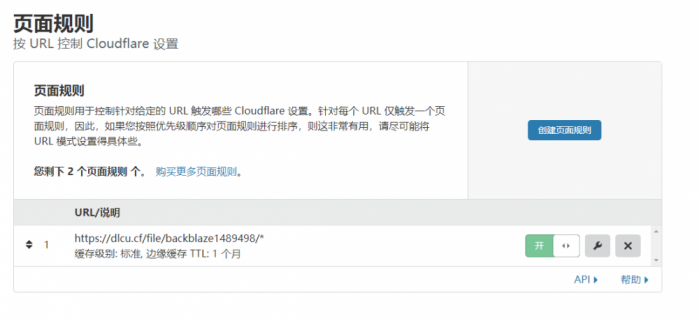
4.加一条页面缓存规则.
5.创建一个 workers,粘贴下列代码,记得 b2domain 和 bucket 的值改成自己的
'use strict';
const b2Domain = 'img.domain.com'; // configure this as per instructions above
const b2Bucket = 'bucket-<a href="https://www.zjzjcp.com/tag/name" class="st_tag internal_tag" rel="tag" title="标签 Name 下的日志">name</a>'; // configure this as per instructions above
const b2UrlPath = `/file/${b2Bucket}/`;
addEventListener('fetch', event => {
        return event.respondWith(fileReq(event));
});

// define the file extensions we wish to add basic access control headers to
const corsFileTypes = ['png', 'jpg', 'gif', 'jpeg', 'webp'];

// backblaze returns some additional headers that are useful for debugging, but unnecessary in production. We can remove these to save some size
const removeHeaders = [
        'x-bz-content-sha1',
        'x-bz-file-id',
        'x-bz-file-<a href="https://www.zjzjcp.com/tag/name" class="st_tag internal_tag" rel="tag" title="标签 Name 下的日志">name</a>',
        'x-bz-info-src_last_modified_millis',
        'X-Bz-Upload-Timestamp',
        'Expires'
];
const expiration = 31536000; // override browser cache for images - 1 year

// define a function we can re-use to fix headers
const fixHeaders = function(url, status, headers){
        let newHdrs = new Headers(headers);
        // add basic cors headers for images
        if(corsFileTypes.includes(url.pathname.split('.').pop())){
                newHdrs.set('Access-Control-Allow-Origin', '*');
        }
        // override browser cache for files when 200
        if(status === 200){
                newHdrs.set('Cache-Control', "public, max-age=" + expiration);
        }else{
                // only cache other things for 5 minutes
                newHdrs.set('Cache-Control', 'public, max-age=300');
        }
        // set ETag for efficient caching where possible
        const ETag = newHdrs.get('x-bz-content-sha1') || newHdrs.get('x-bz-info-src_last_modified_millis') || newHdrs.get('x-bz-file-id');
        if(ETag){
                newHdrs.set('ETag', ETag);
        }
        // remove unnecessary headers
        removeHeaders.forEach(header => {
                newHdrs.delete(header);
        });
        return newHdrs;
};
async function fileReq(event){
        const cache = caches.default; // <a href="https://www.zjzjcp.com/tag/cloudflare" class="st_tag internal_tag" rel="tag" title="标签 CloudFlare 下的日志">Cloudflare</a> edge caching
        const url = new URL(event.request.url);
        if(url.host === b2Domain && !url.pathname.startsWith(b2UrlPath)){
                url.pathname = b2UrlPath + url.pathname;
        }
        let response = await cache.match(url); // try to find match for this request in the edge cache
        if(response){
                // use cache found on <a href="https://www.zjzjcp.com/tag/cloudflare" class="st_tag internal_tag" rel="tag" title="标签 CloudFlare 下的日志">Cloudflare</a> edge. Set X-Worker-Cache header for helpful debug
                let newHdrs = fixHeaders(url, response.status, response.headers);
                newHdrs.set('X-Worker-Cache', "true");
                return new Response(response.body, {
                        status: response.status,
                        statusText: response.statusText,
                        headers: newHdrs
                });
        }
        // no cache, fetch image, apply <a href="https://www.zjzjcp.com/tag/cloudflare" class="st_tag internal_tag" rel="tag" title="标签 CloudFlare 下的日志">Cloudflare</a> lossless compression
        response = await fetch(url, {cf: {polish: "lossless"}});
        let newHdrs = fixHeaders(url, response.status, response.headers);

  if(response.status === 200){

    response = new Response(response.body, {
      status: response.status,
      statusText: response.statusText,
      headers: newHdrs
    });
  }else{
    response = new Response('File not found!', { status: 404 })
  }

        event.waitUntil(cache.put(url, response.clone()));
        return response;
}
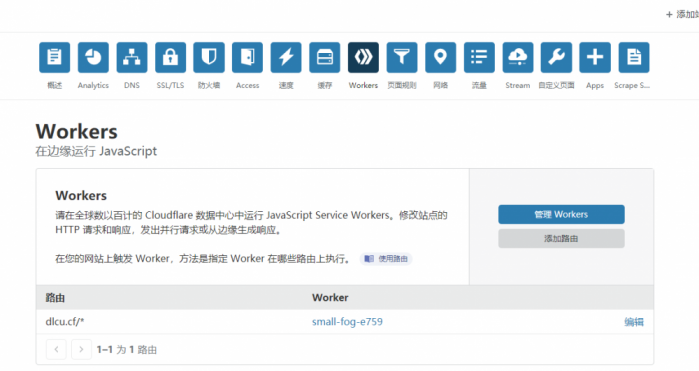
6.workers 里添加路由,使访问你的域名时,先走 workers
访问一下你的图片文件
比如说一开始是 https://f000.backblazeb2.com/file/backblaze1489498/wallhaven-md2x8m.jpg
现在用 https://dlcu.cf/wallhaven-md2x8m.jpg 就可以访问了
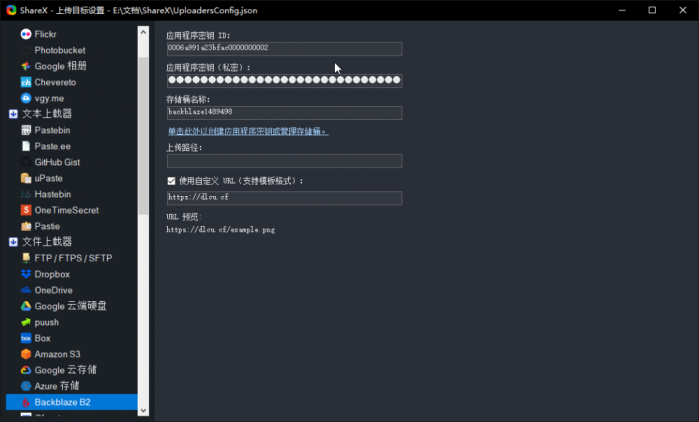
7.配置 ShareX.
这个感觉没啥好说的,主页面–目标–上传目标设置–backblaze b2,填上就行了
结束
这个的好处就是方便了上传,自己在电脑前,截一下图直接上传,或者复制一下直接上传
还有就是可以用自己的域名,再说的话就是数据自己也能找回.
原文:https://www.wangfuchao.com/1290/
声明:1、本博客不从事任何主机及服务器租赁业务,不参与任何交易,也绝非中介。博客内容仅记录博主个人感兴趣的服务器测评结果及一些服务器相关的优惠活动,信息均摘自网络或来自服务商主动提供;所以对本博客提及的内容不作直接、间接、法定、约定的保证,博客内容也不具备任何参考价值及引导作用,访问者需自行甄别。2、访问本博客请务必遵守有关互联网的相关法律、规定与规则;不能利用本博客所提及的内容从事任何违法、违规操作;否则造成的一切后果由访问者自行承担。3、未成年人及不能独立承担法律责任的个人及群体请勿访问本博客。4、一旦您访问本博客,即表示您已经知晓并接受了以上声明通告。